IBM CLOUD

IBM Cloud is one of the sufficient tools that our team used to accomplish the project Missing Map. We are willing to share the experience with IBM Cloud. At the beginning step, tutorials of IBM Cloud give us a brief introduction and guidance to be familiar with the tools. We can start the project and add more ideas easily. There are a large number of IBM tools that we can use. Watson AI is a powerful and effective tool. Especially, Visual Recognition is an important tool that supports this project. We can train the classified images and build the final result. Another tool is Node-red. Node-red is an understandable and useful programming tool. It provides a browser-based flow editor that allows us to write program codes and organize these codes by using lots of nodes in a proper position. For instance, we used it to organize the codes of website. 

All elements are at the proper position and connected in sequence. It is easier to add more functions and debug.

Although there are many benefits when we developed the project, some challenges still exist. Hidden functionality perplexes us sometimes. Some instructions are not clearly. When we created Cloud Foundry Applications, there may be some complex problems sometimes. For instance, maye One of our team members cannot create or modify these applications. In addition, others associated applications and services would be created when we create a new Cloud Foundry application.

For example, we created a Node-RED Starter. SDK for Node.js and Cloudant is also created. But no clearly and specifically description and instruction to make users to understand how it works.   

Similarly, Storage is needed when we created a new project in IBM Watson Studio. No description and instruction make us confused at the beginning. We use Node-red tool to do our project. But unfortunately, the feature of Node-red project is not currently available in IBM Cloud environment. Another problem is non-informative log. 

Although it can record the operators (type, instance, logs, time, actions) and error, the logs are not specifically and clearly. We can view the logs in Kibana, but there is the same problem. 

To Read and figure out the logs can cost much time. It is better to add some description to the logs, which is convenience for both developers and others team members to understand the operators. Another problem is the sequence and completeness of the logs. We can check the logs sequence ordered by time. If we chose the newest order, it is not corresponded to the general command line order. In another hand, if we chose the oldest order, we should pull the webpage to the bottom manually when we refresh the webpage every time. 

Lack of community resources is another problem. We always found the resources that can be used from websites and dataset. In this process, we often encounter difficulties. Some resources are not corresponded to the tool and they are not used directly. A community resource library is needed for IBM Cloud. 

This experience that developed a project with IBM Cloud, we have made great progress. Although there are some challenges in this tool, IBM Cloud would be a the most powerful development tool.  

Development

Methodology

As previously mentioned, we adopted an agile development methodology – rather than strictly defined user requirements and many, many design documents, we decided to just get stuck in. We did some planning, and then got to work on the project.

In particular, development took place in roughly 2-week sprints. At the start of each sprint, we would define what we wanted to achieve in that sprint – e.g. a couple features and some refactoring. Then, we would meet with our supervisor and sponsor and show them the progress we have made so far, and note down any tips or thoughts they had. This would feed into the next sprint, so we would know what to do.

Workflow

For development of the Missing Maps Project, we used GitHub as our code repository, and a particular Git workflow. We all already had experience with Git, some more than others, so Git was the logical conclusion to develop the project with.

We followed the workflow detailed at:
https://www.atlassian.com/git/tutorials/comparing-workflows/feature-branch-workflow

Related image
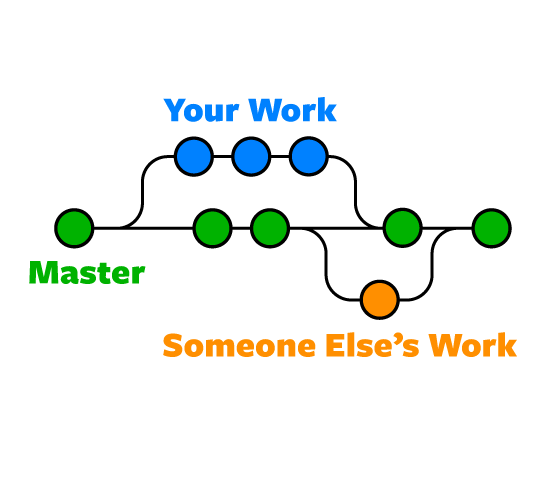
Pretty simple image that captures what the workflow is all about – without the pull requests and merge conflicts

Essentially, development is encapsulated in development branches. Any time we want to add new features, we create a dedicated branch for that feature, which uses a copy of the current version of the master branch. Then, we work on that branch, test it, and refactor it, to ensure that the feature works AND is in line with the standards of the master branch – i.e. it is efficient, clean, and well structured.

Then, we merge the development branch with the master branch, and the new feature is added. The workflow also allows multiple people to work at the same time – each person checks out a new branch and works on their own branch, then merges with master when done. Of course, this may create conflicts – so rather than merging with master, the person creates a pull request, asking if they can merge with master. Everyone reviews the pull request, and if everything is good, the person can merge with master.

This is what we followed during development of our project – and worked well. This kind of workflow is pretty easy to follow, and effective, so was a great choice.

Planning the Front-End

With the requirements defined, we had a clear vision of what the end-result of the project will look like, and what we needed to do to achieve it. Well, we sort of did – it became apparent over the coming weeks that there some other things that we had to think of. But for now, we worked on the front-end.

Frameworks

Image of some JavaScript Frameworks
There’s a lot.

When it came to beginning programming, we had to choose a JavaScript framework to use. Having prior experience with JavaScript, but not really with particular frameworks (although some team members did have), made it kind of overwhelming, seeing all these crazy frameworks, but the choice wasn’t too difficult in the end. We considered multiple –

Angular

Angular.js logo

Quite a popular and well-known framework, Angular is just great – not only is it easy to understand, its design enforces the MVC architecture. While this is still affected by our ability to program and create maintainable code – its made easier to do so. The other aspects of Angular such as its two-way binding, are also great, but I feel like it wasn’t as important in our decision. Angular would be a good framework to use for our project.

React

Cool React.js logo

React is another framework, and is mainly used for UI applications. It’s architecture allows for straightforward coding and easy re-usability of components. Overall its great, like Angular. Furthermore it can be used with other frameworks, so if we wanted to we could just use multiple.

Vue

Vue.js logo

Vue takes concepts from Angular and React and combines them into a lightweight framework. It offers a lot of things that make programming with Vue easier such as the code being easy to understand, being flexible, and having components – which are quite a powerful feature. Vue seemed great for our application, and with Yi’s prior experience with the framework, it was decided that Vue would be what we use.

The First Demo

With the framework decided, it was time to plan the interface design for the front-end and also create a demo, to show John and Mercedes at our next meeting. This would also allow us to be better prepared when the proper development started, and show our idea of what the front-end should look like – thus, if John or Mercedes had any suggestions, we could apply them to the 1st iteration of our actual application.

In our application, the front-end will be made up of the ‘Image Submit’ page, where the user drags and drops images (or selects from file system), and later in the project may also be able to edit the image more finely. There will also be an ‘Output report’, displayed to the user after the image has been classified by the classifier, which gives details such as –

  • Whether the image contains habitation or not – yes or no
  • The output from the image classifier i.e. the image with segments and confidence ratings, etc.
  • Date, time taken to classify, and more

James developed a demo using JQuery, whilst Yi worked on one with Vue.js. Both gave ideas about how to approach the front-end, and also resulted in us coming up with additional ideas on how to improve it.

{{{INSERT GIF OF JAMES DEMO}}}

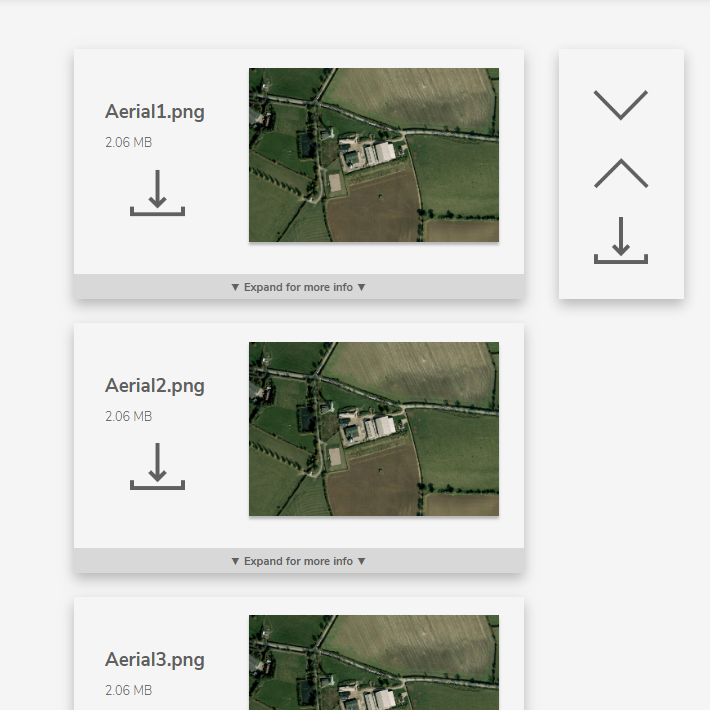
In addition to the demo’s for the ‘Image Submit’ page, James also created a demo for the ‘Output Report’ Page.

The idea is that the images are shown here, classified, and with more information available by expanding the image. You can also download the images and scroll up and down etc.

These demo’s solidified our understanding in what was expected from the front-end of the application, and with it, we begun to look into our next requirement, which was how the image classifier was going to classify an image, and what classifier we were even going to use. Would we use supervised or unsupervised learning? Would we use Image Segmentation? As such, some research was required.

Image result for image segmentation
Segmentation of a plane. Easy since the sky and the airplane are fairly distinct and are easily seperable by a threshold but what if it was a satellite image. A house can be covered by trees. So how would the image classifier know there’s a house there?

Thanks for reading.

Initial Planning – requirements

During the initial idea gathering process before Christmas, it became apparent that the project wouldn’t just be some JavaScript linked with a Watson Visual recognition service, in a simple web-page. In particular, there were several areas we would need to research before beginning development –

  • Initial planning and Use-Cases – how will users actually use the application?
  • Front-end Design and Framework
  • Image Classification and getting a trainer data-set
  • Node-RED and how the components will communicate

What does the application need to do?

The first thing we had to do before we even started anything else was think about how users will actually use our application. This would then define what the application needs to do – since ‘front-end application that allows users to input an image and see whether it has habitation or not’ is a bit vague.

However, who are the users? IBM Employees? Missing Maps volunteers? We also had many other questions, such as:

  • Where are the images from? Are they from OpenStreetMap, or somewhere else?
  • What sizes are the images? Is there some standard size?
  • What level of detail should our classifier classify? E.g. should the classifier draw outlines of buildings, or even identify what type of building it is?
Would it mark the roads and houses like this? Or just output yes / no – yes this image has habitation, or no?

In total we had a lot of questions so we met with John, who had come forward from IBM with the project call, and he answered all of them.

The users were members of the public, so anyone could be using our application to classify images. With the rest of the information from the questions, we set about to develop some use-cases – how those members of the public may typically use the application.

Use-Cases / User Stories

For an agile methodology, which is what we are employing for the development of our project, Users Stories are a pretty standard way of getting the requirements for a system.

They should be short, simple, and easily testable. We started out by defining some epics some as:

As a user, I can click on a button to upload an image to the application, through choosing an image from my file-system. A loading bar tells me how long the image will take to upload. Once they are uploaded and I am sure I have chosen the right image, I click the submit button to submit it to the image classifier.

And then broke it down into smaller stories such as:

I can press the “Upload image” to open a pop-up window that allows me to navigate through my file system.

When it comes to testing the application later down the line, we can just press the upload image button and if it does what it says here then we’ve fulfilled 1 requirement. That way its easier to know when the application actually works as intended.

Since we used a more agile methodology, later down the line we didn’t really stick to rigorous requirements, just a well-defined idea of what the project should do.

Setting up other things

Part of the initial planning stage was also to set up things like a document respository, a version control repository etc. These things we had learned last term as part of a module, so we were better prepared when it came to this stuff.

We chose Github to host our repository, which is widely-used and we had prior experience with. Google Drive as a document repository is pretty good, since we can also edit documents at the same time, and is easy to navigate. Furthermore, to set up this blog, John suggested WordPress. There’s also Blogspot, but I opted against it since WordPress just seemed better and more suitable for the project.

With the repositories all set up, and the requirements for the application better defined, we set about to determine other important parts, such as the interface design, what JavaScript framework we would use, etc, which I will detail in the next post.

Thanks for reading 🙂